Use case · Lead generation
Lead generation chatbot that qualifies visitors before sales calls
Chyt.ai is a lead generation chatbot that asks your qualification questions in a guided flow, saves the answers as a lead with the visitor's agreement, and hands ready buyers to your sales team. Qualification questions run as deterministic flow steps, so they use no AI credits, and AI answers about your product remain available in the same chat. Leads, stages and verified contacts are managed in one dashboard.
Who it is for: Founders, marketers and sales leads at B2B and service businesses who want qualified enquiries rather than anonymous traffic
The problem
Visitors leave without starting a conversation
A contact form asks for commitment before it gives anything back. Many visitors with a real need read two pages and go, and you never learn what they were looking for.
Sales time goes on enquiries that were never a fit
Without a few consistent questions up front about need, team size and timeframe, every enquiry looks the same. Sales calls become the qualification step, which is the most expensive place to do it.
Lead details are scattered and unverified
Names in chat transcripts, emails in a form tool, notes in a spreadsheet. Nobody is sure which contact details are genuine or which enquiries have been followed up.
How Chyt.ai solves it
A guided qualification flow with buttons and conditions
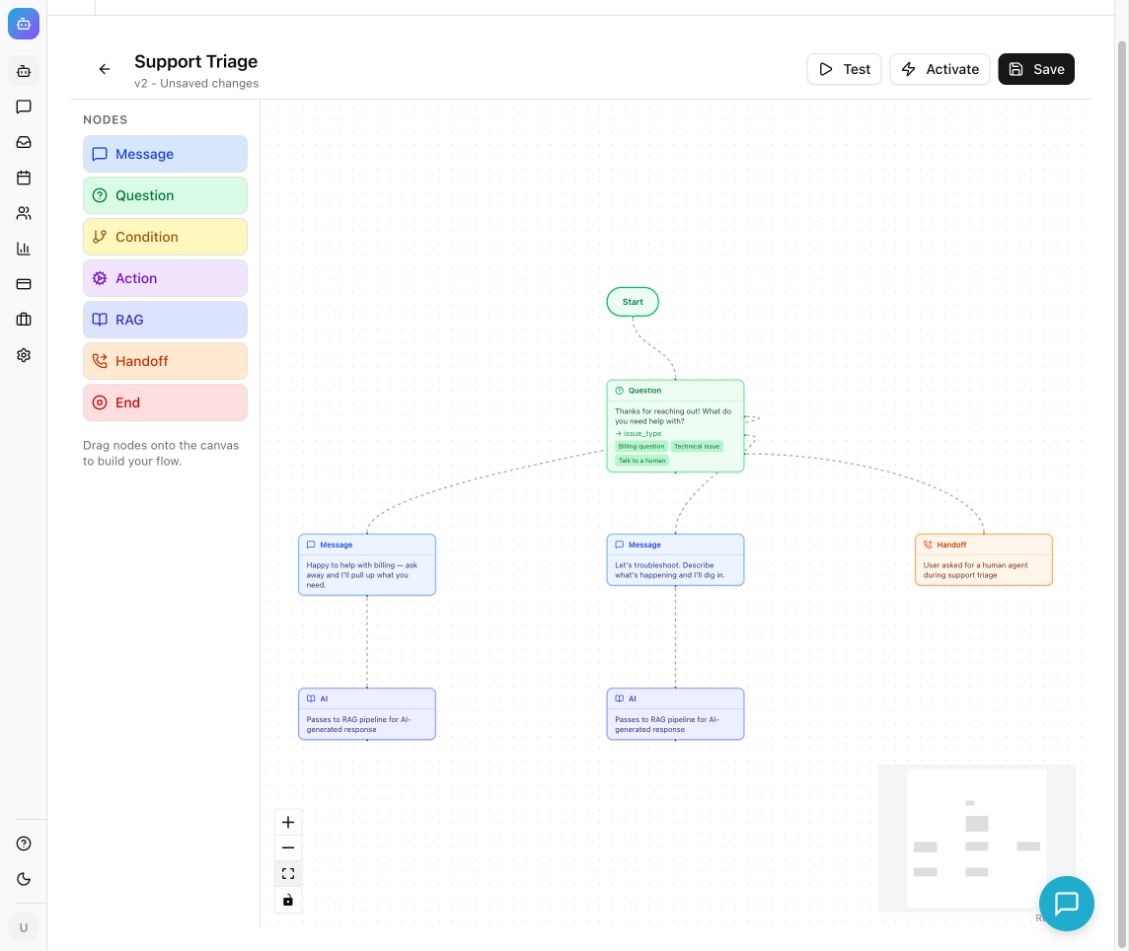
Build the questions your sales team actually asks as a flow: Question nodes with buttons or free text, answers stored in variables such as {{team_size}}, and Condition nodes that branch on what the visitor said. Start from a template, build by hand, or let the AI Wizard draft a flow that stays inactive until you have reviewed it.
Read the guideSave lead in Chyt, with the visitor's agreement
The Save lead in Chyt action maps captured answers such as name, company, job title, service interest, team size, timeframe and project goal into a lead record, without AI. Place an explicit save choice before it so the visitor agrees first. Skipped answers are simply left out.
Read the guideA leads dashboard with stages, scores and transcripts
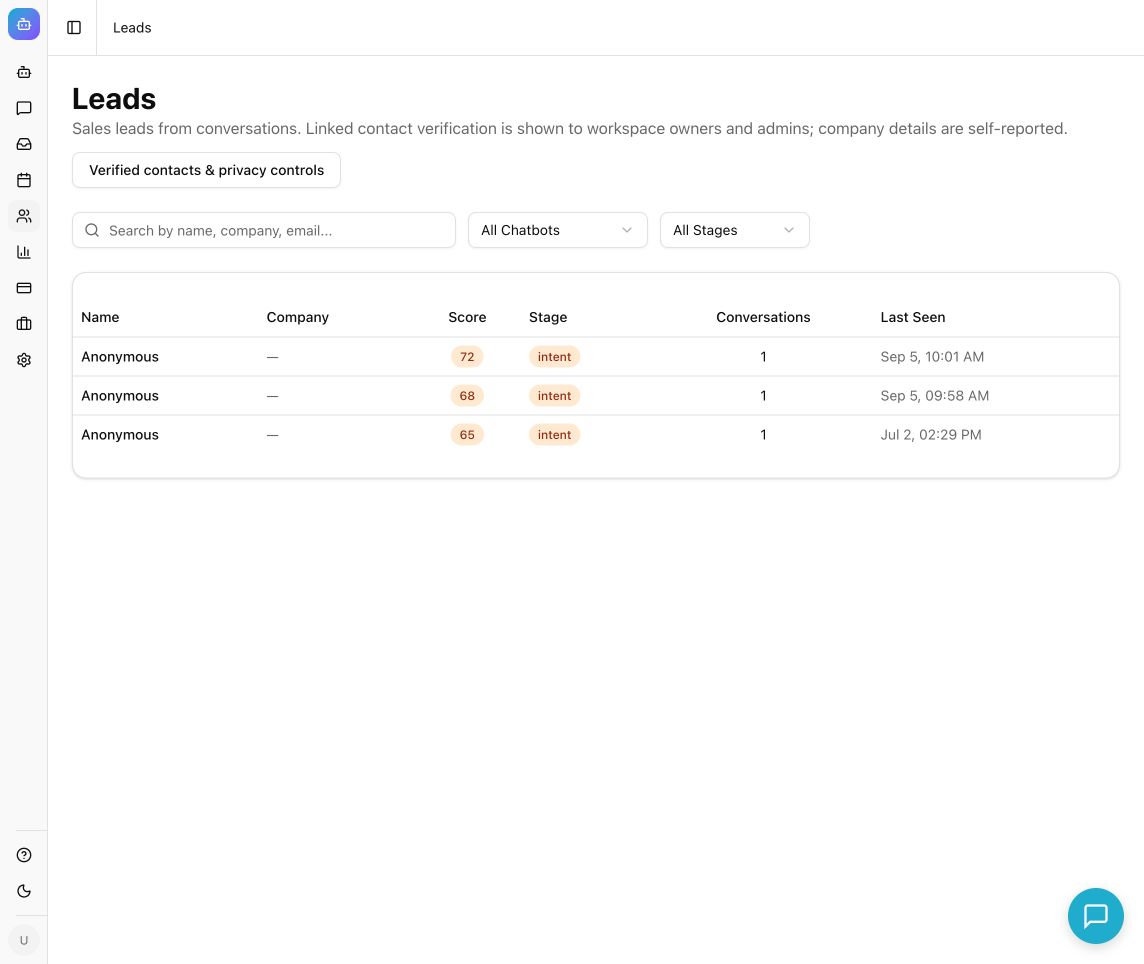
Search leads by name, company or email, filter by chatbot and stage, and open any lead to see its profile, qualification and linked conversations. AI conversations add a model-assisted lead score; your team sets the stage that reflects its own assessment. Verified contacts are recorded separately with the method that was verified, such as email OTP.
Read the guideHubSpot, Google Sheets and webhook functions
Connect HubSpot, Google Sheets, Slack, Zapier and other integrations from the catalogue where they are available for your workspace, and install their functions so the AI assistant can call them during a conversation. Custom webhook functions reach any other system. Always confirm the record in the destination tool when you test.
Read the guideHandoff to sales while the buyer is still there
Route high-intent answers to a Handoff node. The conversation appears in the shared inbox, where a salesperson who is online can claim it and reply in the same chat window with the qualification answers already in view.
Read the guideWhat the conversation looks like
An illustrative example. Your assistant uses your own content, wording and flows.
- Assistant
Thanks, Anita. What kind of project do you have in mind? [New website] [Redesign] [Ongoing support]
Flow question with buttons, using the name stored by an earlier question — no AI credits used - Visitor
Redesign
- Assistant
Good to know. When would you like the redesign to go live? [Within a month] [One to three months] [Just exploring]
Answer stored in a flow variable; a Condition node routes on it next - Visitor
Within a month
- Assistant
Understood. May I save your name, company and these answers so our team can prepare for the conversation? [Yes, save my details] [No thanks]
Explicit save choice placed before the Save lead in Chyt action - Visitor
Yes, save my details
- Assistant
Thank you. Your enquiry is saved, and because your timeline is short I am passing this chat to our sales team now. They reply here during working hours.
Save lead in Chyt creates the lead without AI, then a Handoff node sends the chat to the inbox
Set it up in 5 steps
- 1
Write down your qualification questions
Agree on four or five questions with sales: the visitor's name and company, what they need, team size and timeframe. Decide which answers mean a lead should reach a person straight away.
- 2
Build the flow
Create a flow in the Flows tab from a template, the AI Wizard or a blank canvas. Add a Question node for each question, store each answer in a named variable, and connect every button to its next step.
- 3
Add consent, Save lead and the ending
Ask whether the visitor is happy for you to save their details, then connect Yes to an Action node set to Save lead in Chyt. Finish each path with End, Handoff for sales-ready visitors, or a RAG node for product questions.
- 4
Test every branch, then activate
Use Test Flow and restart it for each button, unexpected input and ending. The simulator previews lead capture without creating a record, so confirm a real lead from a fresh public conversation after activation.
- 5
Work the leads dashboard
Review new leads, read the source conversation before relying on a score, update stages, and follow up through your own sales process or a connected integration.
Inside the product
What it means for the business
Every enquiry arrives with the same core facts
Need, company, size and timeframe are captured in a consistent structure, so sales can prioritise without a discovery call.
Ready buyers reach a person quickly
High-intent answers route to the inbox while the visitor is still on your site, rather than into a form queue.
Qualification that does not consume AI credits
Flow questions are deterministic. Every active plan includes unlimited flow conversations, and AI credits are used only where you choose to hand over to AI answers.
Clearer records and honest contact data
Leads, stages, transcripts and verified contact methods live in one place, with export and erasure controls for contact details.
Frequently asked questions
- What is a lead generation chatbot?
- A lead generation chatbot is a chat assistant that engages website visitors, asks qualifying questions and records their details for your sales team. Chyt.ai does this with guided flows that ask fixed questions using buttons or free text, a Save lead in Chyt action that creates the lead record, and optional AI answers about your product from your own content.
- Does lead qualification in Chyt.ai use AI credits?
- Not when it runs as a flow. In Chyt.ai, messages handled entirely by flow nodes such as Question, Condition and Action use no AI credits or model tokens, and every active plan includes unlimited deterministic flow conversations. AI credits are used only if the flow reaches a RAG node or the visitor asks an open AI question.
- Can Chyt.ai send leads to HubSpot or Google Sheets?
- Chyt.ai's integration catalogue includes HubSpot, Google Sheets, Slack, Jira, Zapier, Google Calendar and email, subject to availability for your workspace. Once connected, you install the integration's functions so the AI assistant can call them during a conversation. A lead appearing in the Chyt.ai dashboard does not by itself create a CRM record, so test the integration and confirm the result in the destination tool.
- How does Chyt.ai verify a lead's contact details?
- Chyt.ai can ask visitors to verify a contact method with a one-time code, for example by email. The Verified contacts list shows which method was verified. That badge proves access to that method at the time of verification; it is not proof of legal identity or marketing permission, and other details such as company name remain self-reported.
- Are leads scored automatically?
- Conversations answered by AI in Chyt.ai receive a model-assisted lead score and extracted profile details. Conversations that run purely through a deterministic flow skip AI scoring, so add a Save lead in Chyt action to capture those enquiries. Treat any score as a prompt to read the conversation, and set the lead stage from your own assessment.
Try it with your own content
Build a demo assistant from your website or files in minutes. Flat monthly pricing, never per message.
Related use cases
Guided flows (no AI)
Build scripted, auditable chatbot journeys in Chyt.ai's flow builder. Fixed wording, button choices, zero AI credits, and unlimited on every active plan.
ExploreAppointment booking
Chyt.ai lets visitors check availability and book a meeting inside the chat, using your working hours and rules, with optional Google Calendar sync.
ExploreWhatsApp chatbot
Connect your own WhatsApp Business number to Chyt.ai through the Meta Cloud API. One chatbot answers from your content on web and WhatsApp, with team inbox.
ExploreFurther reading
Chatbot lead generation: qualify and capture leads 24/7
How a lead generation chatbot qualifies visitors with a guided flow, saves leads, verifies contacts, hands hot prospects to your team and books meetings.
6 min readFlows & automationHow to build a flow-based chatbot without code
A step-by-step guide to building a no-code conversation flow: nodes, variables, buttons, conditions, lead capture, testing, activation and AI fallback.
6 min readFlows & automationDeterministic vs AI chatbots: when to use each (or both)
Deterministic chatbots follow fixed flows; AI chatbots generate answers from your content. Compare cost, control and fit, and learn how to combine both.
6 min read