Channels
Voice AI agents in Indian languages: what works today
What voice AI agents can do in Hindi, Tamil and other Indian languages today: how browser voice chat works, good use cases, design tips and honest limits.
On this page
Many customers in India would rather speak than type, and would rather do it in their own language. Voice AI agents are now a realistic way to serve them: speech recognition and synthetic voices are available for the major Indian languages, and they handle everyday support questions well when the experience is designed around what voice does best.
This article explains what a voice AI agent is, how browser voice chat works in Chyt.ai, where it fits, how to design for it, and where the limits are.
What is a voice AI agent?
A voice AI agent is an assistant that holds a spoken conversation. It has three parts working in a loop.
- Speech-to-text (STT) turns what the person says into text.
- An answering engine works out the reply. In a knowledge-based agent this is retrieval-augmented generation: the system finds relevant passages in your content and writes an answer grounded in them.
- Text-to-speech (TTS) reads the reply aloud in a natural-sounding voice.
The quality of a voice agent in any language depends on all three. Good Hindi speech recognition is of little use if the answers come from a generic model rather than your own policies and prices, and accurate answers are wasted if the voice is hard to follow.
How does browser voice chat work in Chyt.ai?
In Chyt.ai, voice is a mode of the chatbot you already have. A visitor opens the chatbot in a microphone-enabled browser, starts voice, approves the browser's microphone permission and speaks. There is nothing to install and no number to dial.
Because it is the same chatbot, the voice session draws on the same knowledge sources, persona and settings as text chat. You do not maintain a second script for voice.
Supported languages
The current language options are:
| Language | Language |
|---|---|
| English | Marathi |
| Hindi | Gujarati |
| Tamil | Bengali |
| Telugu | Punjabi |
| Kannada | Odia |
| Malayalam |
You choose a Default Language and the set of Allowed Languages a visitor can pick from. Offer only the languages your content and your team can genuinely support.
What you can configure
- Voices. A simple mode lets you pick a female voice, a male voice and a default selection. A detailed mode lets you set a default voice, a list of allowed voices and optional custom display names.
- Max Session Duration. A cap on how long one voice session can last. A session can also end earlier if the workspace's remaining allowance is shorter.
- Auto-Greeting. Whether the assistant speaks first when the session starts.
- Visitor verification. If you have enabled verification for the chatbot, visitors complete that prompt before voice starts.
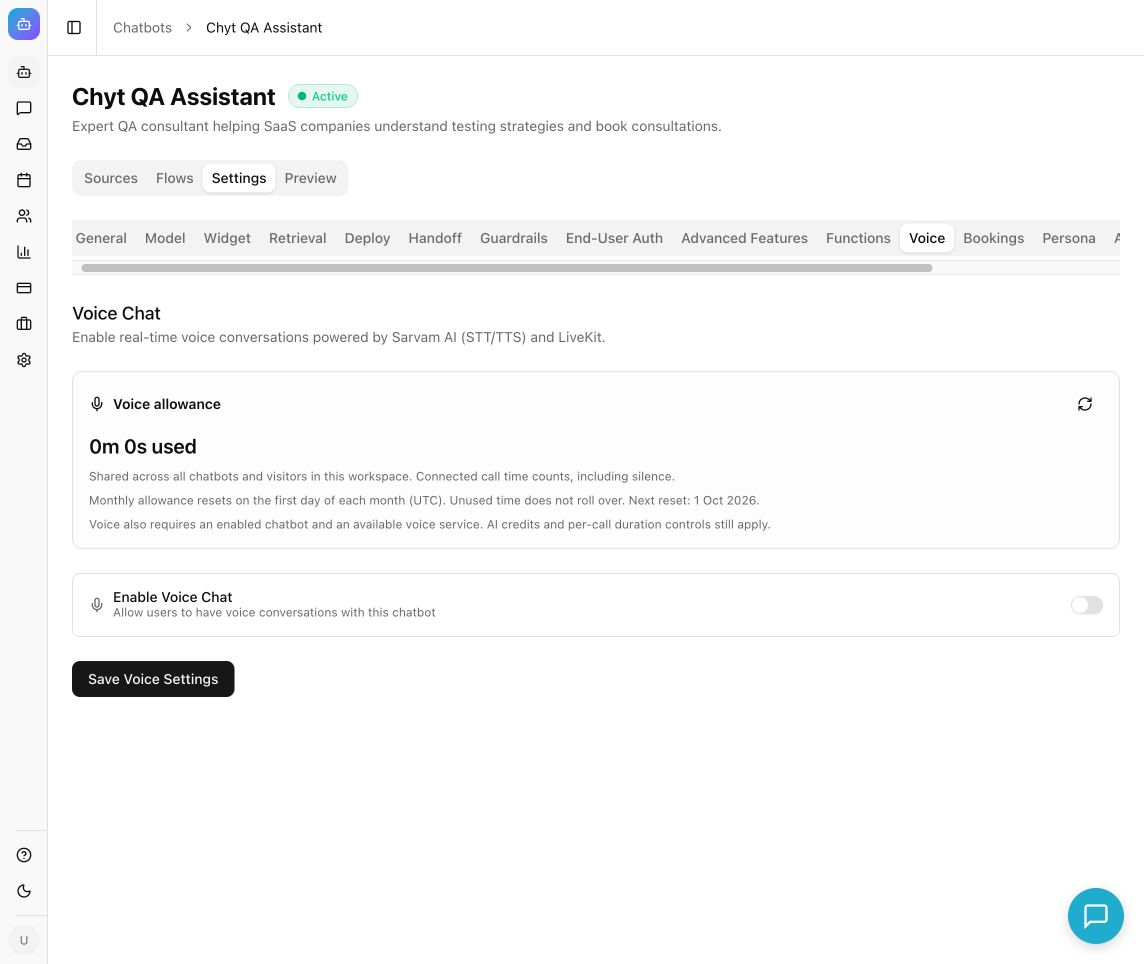
Setup is short: open Chatbots → your chatbot → Settings → Voice, review the allowance, turn on Enable Voice Chat, choose languages and voices, set the session options and select Save Voice Settings. Then test a real conversation in the chatbot's preview or public chat page. The help guide on enabling and tuning browser voice chat walks through each step.
Voice allowances by plan
Voice time is metered separately from AI credits, as a workspace-wide allowance.
| Plan | Browser voice allowance |
|---|---|
| Free trial | 1 hour for the entire trial; it does not renew |
| Starter | 5 hours per calendar month (UTC) |
| Pro and Enterprise | Voice is included subject to availability; check the live allowance card in your workspace |
A few rules are worth knowing before you launch:
- The allowance is shared across all chatbots and visitors in the workspace.
- Connected time counts, including silence. A visitor who leaves a session open uses time.
- Active or connecting calls can reserve time; unused time is returned once the call is settled.
- Monthly allowances reset on the first day of the month in UTC. Unused time does not roll over.
- AI-generated voice answers also use the workspace's AI credits, like any other AI response.
Current plan details are on the pricing page, and the mechanics are explained in the guide to plans, AI credits and voice allowances.
Where do voice agents work well?
Voice suits short, focused exchanges where speaking is easier than typing.
- Routine support questions. Opening hours, order and delivery policies, eligibility, documents required, how to complete a process. These are the same questions a customer support chatbot handles in text.
- Visitors who prefer their first language. Someone comfortable speaking Marathi or Bengali may struggle to type it, or to read a long English page. Spoken answers lower that barrier.
- Hands-busy or mobile contexts. People on a phone browser, on the move, or less confident with keyboards.
- Accessibility. Voice gives another route to the same information for people who find reading or typing difficult.
- Guided explanations. Walking someone through steps one at a time, with the chance to ask "what does that mean?" in between.
Voice is a weaker fit for anything that needs the person to read, compare or copy: long lists, tables, links, reference numbers and addresses. For those, text channels do better. A WhatsApp Business chatbot is a natural companion to on-site voice for that reason.
Design tips for voice conversations
Keep answers short. A paragraph that reads well on screen is tiring to listen to. Aim for two or three sentences, then offer more: "Would you like the steps?" The chatbot's persona instructions are the place to ask for brief, conversational replies.
Confirm what matters. Names, dates, amounts and numbers are where speech recognition is most likely to slip, in any language. Have the assistant repeat critical details back before acting on them.
Write content that sounds natural aloud. Answers are only as good as the source content. Plain sentences, spelled-out terms and consistent product names are easier to retrieve and easier to pronounce than dense jargon or abbreviations.
Test in every language you enable. Ask a short question in each one, listen to the whole answer, and check pronunciation of your brand and product names, as well as how the agent behaves when interrupted. Test the way your customers actually speak, including regional accents and sentences that mix English with another language, and decide from the results which languages you are ready to offer.
Always provide a fallback. Tell visitors they can switch to text chat at any point. In text, the chatbot can hand a conversation over to a human agent when you have handoff configured, which is the right route for complaints, exceptions and anything sensitive.
Set the greeting and duration deliberately. An auto-greeting that states the languages on offer and what the assistant can help with sets expectations. A sensible maximum session duration protects your allowance from idle sessions.
Check usage after testing. Return to the voice allowance card and refresh it once a call has closed, so you understand how real conversations consume time.
What are the limits today?
Being straightforward about limits avoids disappointing customers.
- Availability is not guaranteed. Voice depends on external speech and real-time media services. An enabled setting does not override provider unavailability, so keep text chat as the dependable baseline.
- This article is about browser voice. Chyt.ai has a separate Voice (Phone) channel control, which requires an eligible plan, a provisioned phone route and an available voice service. Connecting a phone number is not the same thing as enabling the microphone in the web chatbot, and you should confirm phone availability for your workspace before planning around it.
- Allowances are finite. Time is shared across the workspace and includes silence. When the allowance or AI credits run out, voice stops until they are available again.
- Recognition is imperfect. Background noise, strong accents, code-mixed speech and unusual names reduce accuracy in every voice system. Design for confirmation and easy recovery rather than assuming perfect transcription.
- Answers are grounded, not infallible. Responses come from your content, so gaps or outdated pages produce weak answers. Review conversations and fill the gaps.
Next steps
Start by getting the text chatbot right, because voice inherits its knowledge. Try the Chyt.ai demo with your own website, then follow the help guide on enabling and tuning browser voice chat to switch on one or two languages, test with real speakers, and expand from there.
Frequently asked questions
- Which Indian languages does Chyt.ai voice chat support?
- Chyt.ai browser voice chat currently offers 11 language options: English, Hindi, Tamil, Telugu, Kannada, Malayalam, Marathi, Gujarati, Bengali, Punjabi and Odia. You choose a default language and which languages visitors are allowed to select. Voice is subject to service availability.
- How does a voice AI agent work?
- A voice AI agent converts speech to text, generates an answer, and converts that answer back to speech. In Chyt.ai the answer comes from the same chatbot used for text chat, so spoken replies are grounded in your own knowledge sources rather than in a separate voice script.
- How much voice time is included in Chyt.ai plans?
- The Chyt.ai free trial includes one hour of browser voice for the entire trial, and Starter includes five hours per UTC calendar month. On Pro and Enterprise, voice is subject to availability and the live allowance card in the workspace shows the current entitlement. Time is shared across all chatbots and visitors, connected silence counts, and unused time does not roll over.
- Can I build a Hindi voice bot for my website?
- Yes, when voice is available for your workspace. In Chyt.ai you enable Voice Chat in the chatbot's settings, set Hindi as the default or an allowed language, choose a voice, and test in the chatbot preview or public chat page. Visitors speak through their browser microphone; no app or phone number is needed.
- Does Chyt.ai voice chat work over phone calls?
- Browser voice chat and phone are separate in Chyt.ai. Browser voice runs in a microphone-enabled web browser. A separate Voice (Phone) channel control exists, but it requires an eligible plan, a provisioned phone route and an available voice service, so confirm availability for your workspace before relying on it.
- Does voice chat use AI credits as well as voice minutes?
- Yes. In Chyt.ai, voice time is tracked as a separate workspace voice allowance, and AI-generated spoken answers also consume the workspace's shared AI credits. If either the voice allowance or the AI credits are exhausted, voice sessions are affected until they become available again.
See it with your own content
Build a demo chatbot from your website or files in a few minutes, or start a free trial and design your first flow.