Understand plans, AI credits, and voice allowances
Read the current billing model: unlimited deterministic flow chats, shared AI credits, resource limits, and separate voice usage.
On this page
Before you begin
Open Billing in the workspace you want to review. Plan and payment controls depend on your role and provider availability. Use the live dashboard for current pricing, resource allowances, subscription state, and renewal information.
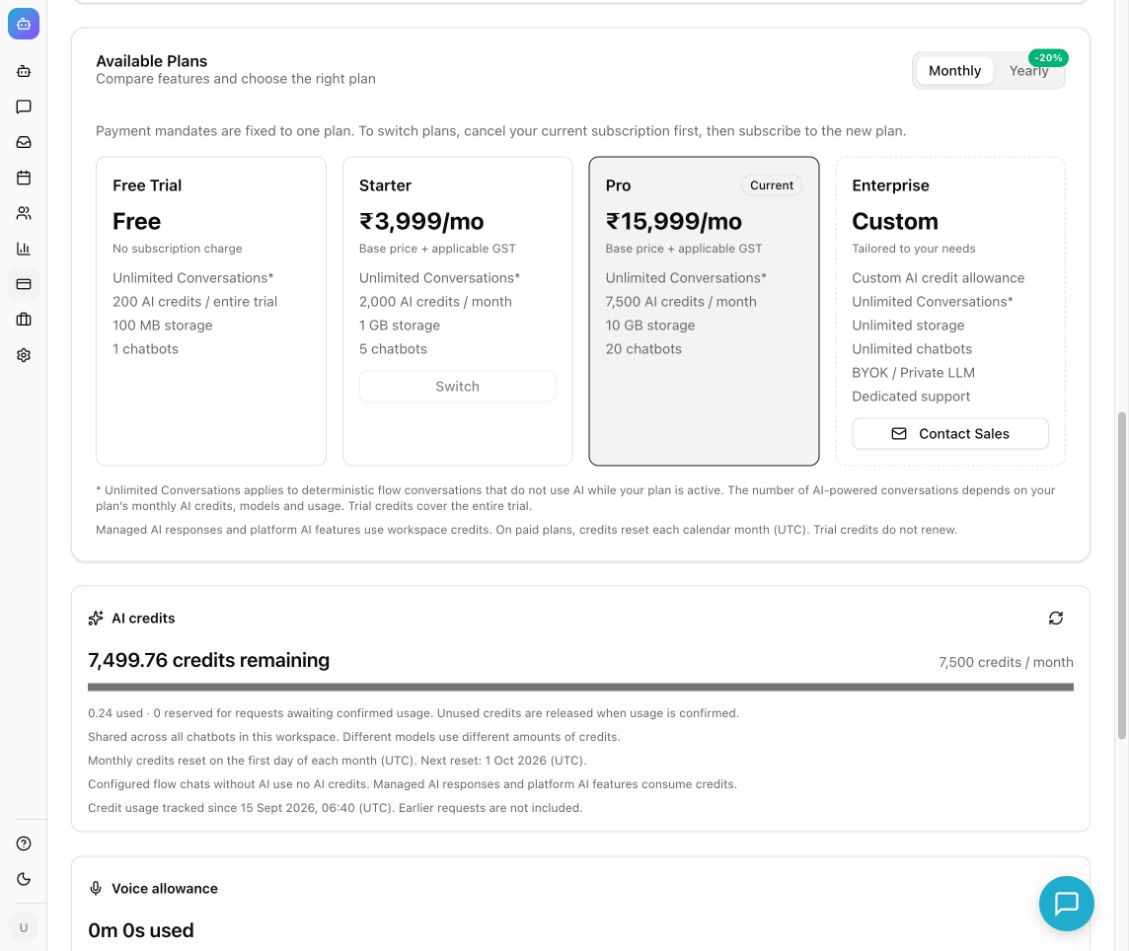
Example from the Chyt.ai dashboard (September 2026).
Understand what is included
As of September 16, 2026, every active plan includes unlimited deterministic flow conversations. These are conversations answered entirely by your configured flow without AI. There are no separate commercial conversation or token caps. Conversation and token totals remain useful analytics.
| Plan | Shared AI credits | Credit period |
|---|---|---|
| Free Trial | 200 | Entire trial; no monthly renewal |
| Starter | 2,000 | UTC calendar month |
| Pro | 7,500 | UTC calendar month |
| Enterprise | Configured allowance | Check your workspace's contract and usage card |
Managed AI responses and platform AI features consume credits. Different models and request sizes consume different amounts. A flow's explicit RAG fallback enters the metered AI path. Chatbot count, storage, trial expiry, visitor safeguards, and feature eligibility remain relevant.
Check usage and capacity
- Open Billing and review Current Plan, subscription status, and the dates displayed.
- Read AI credits. Distinguish used, reserved, and remaining. Reserved credits cover requests awaiting confirmed usage; they are not an extra allowance.
- Use Refresh AI credit usage if you need a new reading. Credit balance unavailable means the balance could not be confirmed; it does not mean no usage occurred.
- Review Voice allowance separately. The trial includes one hour for the entire trial, and Starter includes five hours per UTC calendar month. For other plans, use the allowance actually shown.
- Remember that voice time is shared across all chatbots and visitors and includes connected silence. Active or connecting calls can reserve time; unused time is returned after confirmed call settlement.
- Review Managed LLM vs. BYOK. In BYOK mode, your model provider bills your own-key inference directly; platform auxiliary AI features may still use workspace credits.
- If AI credits are fully used or reserved, managed AI requests pause until credits are available. Configured deterministic text flows can continue while the plan is active, even when the AI ledger is unavailable.
Choose or manage a subscription
- Under Available Plans, choose Monthly or Yearly and review the amount, annual billing terms, resources, and features.
- Select the available Upgrade or Switch control. Review any billing-detail, tax, mobile-number, or recurring-payment consent step shown before proceeding to the payment provider.
- Complete provider checkout and return to Chyt. Confirm the resulting subscription status; a redirect alone is not proof of payment or activation.
- If checkout is pending, use Resume checkout when offered instead of creating another mandate.
- To stop recurring payments, use the cancellation control and read its dialog. For the current Razorpay flow, paid access continues to the shown paid-through date; switching plans requires waiting until the current paid period ends before choosing the new plan.
What you should see
The Billing page shows your subscription state, shared AI balance, and separate voice usage. Pure flow activity can increase conversation counts without reducing AI credits. After checkout or cancellation, use the confirmed status and paid-through date to understand current access.
Troubleshooting
- AI stopped but flows still work: this is expected when AI credits are unavailable or exhausted and the deterministic flow remains eligible.
- Voice stopped while credits remain: voice has its own allowance, availability, and per-session controls.
- Yearly billing but monthly credits: paid AI-credit periods reset on UTC calendar months, independent of annual subscription billing.
- Usage appears older than activity totals: credit tracking starts at the date shown; earlier requests are not retroactively priced.
- Checkout unavailable: read the provider/readiness message and retry its availability check. Do not repeatedly authorize new mandates for an unresolved checkout.
Continue learning
Billing profiles and invoices · Build a deterministic flow · Voice settings