Choose AI models, automatic routing, or your own API keys
Configure Managed or BYOK access, choose response models, understand AI credits, and tune response length and memory.
On this page
Settings → Model controls how a chatbot selects an AI model. Available choices come from your workspace's current model catalog, so use the options and availability messages shown in your dashboard.
Before you begin
Open the intended chatbot and check your workspace's AI balance. For Your API keys (BYOK), you need an eligible plan, valid provider credentials, and access to the exact model and region you intend to use. The UI currently identifies BYOK/private LLM keys as a Pro feature.
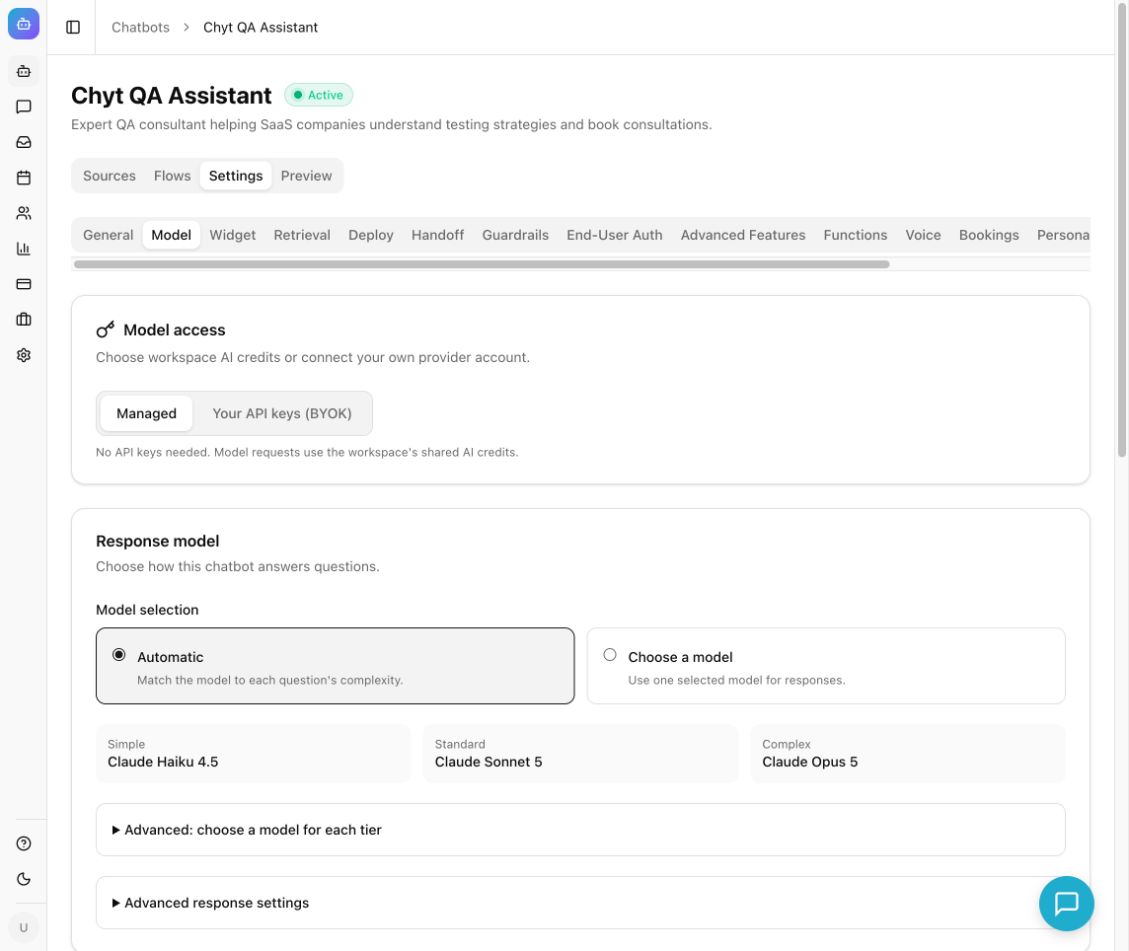
Example from the Chyt.ai dashboard (September 2026).
Use Managed model access
- Open Settings → Model.
- Under Model access, select Managed.
- Under Model selection, choose Automatic to match the model to each question's complexity, or Choose a model to use one selected response model.
- For Automatic, review the Simple, Standard, and Complex models. To override a tier, expand Advanced: choose a model for each tier.
- For a fixed model, choose an available entry under Response model.
- Select Save Changes.
- Open Preview and test a simple question and a question that requires more explanation.
Managed access requires no provider keys from you. The September 2026 managed rollout includes Haiku 4.5, Sonnet 5, and Opus 5; the live catalog remains the authority for availability and routing defaults.
Connect your own provider
- Select Your API keys (BYOK).
- In Provider connections, enable the appropriate provider card.
- Enter the required credentials. Available cards include AWS Bedrock, Sarvam AI, OpenAI, Anthropic, and Azure OpenAI.
- Select Save providers before Test saved connection.
- Under Configured provider, select the saved provider.
- Enter Your model ID using the full provider/model identifier expected by the form. Azure identifiers use the azure/ prefix.
- Optionally expand Advanced: route between your models and enable Route by question complexity. Enter model IDs for the tiers you want to override; empty tiers use the main model ID.
- Select Save Changes, then send a test question in Preview.
A successful connection test does not establish access to every model in that provider account. Confirm the selected model works with your account, permissions, and region. Provider credentials are workspace settings, so coordinate changes with others who use them.
Tune response settings
Expand Advanced response settings. Temperature affects only models that support it; lower values generally encourage more focused responses. Some models manage their own sampling.
Maximum response tokens accepts a whole number from 256 to 16,384. It is a per-response upper limit, not an allowance of conversations. For Sonnet 5 and Opus 5, the limit includes answer and reasoning tokens; reasoning for complex questions requires at least 2,048 tokens.
Use Cross-Session Memory → Enable Memory when you want supported AI conversations to retain user facts for later personalization. Test it with the same visitor or user identity. Deterministic flow conversations that do not invoke AI do not run AI memory extraction.
Understand usage
Managed requests consume AI credits shared across the workspace's chatbots. The displayed conversation figures are estimates based on remaining credits and stated assumptions, not promised conversation counts. Model choice, history, retrieved context, response length, and other AI features affect usage.
With BYOK, the provider bills model responses directly; platform AI features may still consume workspace credits. Pure deterministic flow chats use no AI credits and can continue when AI credits are exhausted while the plan remains active. Voice has a separate allowance.
Expected result: the saved model strategy is used for new AI responses, with its model visible in Preview diagnostics when supplied.
Troubleshooting
If the catalog fails to load, select Retry model catalog. Use Refresh balance & availability for updated credits and availability. If saving is disabled, resolve unavailable model choices, provider configuration, and invalid token limits. For BYOK errors, save credentials again if needed and test the exact model in Preview.
Next: Improve retrieval, set a persona, or troubleshoot responses.