Review conversations and measure performance
Find transcripts, correct answers, export records, and interpret usage and quality metrics.
Updated 3 min read
On this page
Before you begin
Use the workspace that owns the chatbot. Analytics need recorded activity; an empty period is not evidence that a chatbot failed. Have permission to handle any personal or confidential information in transcripts and exports.
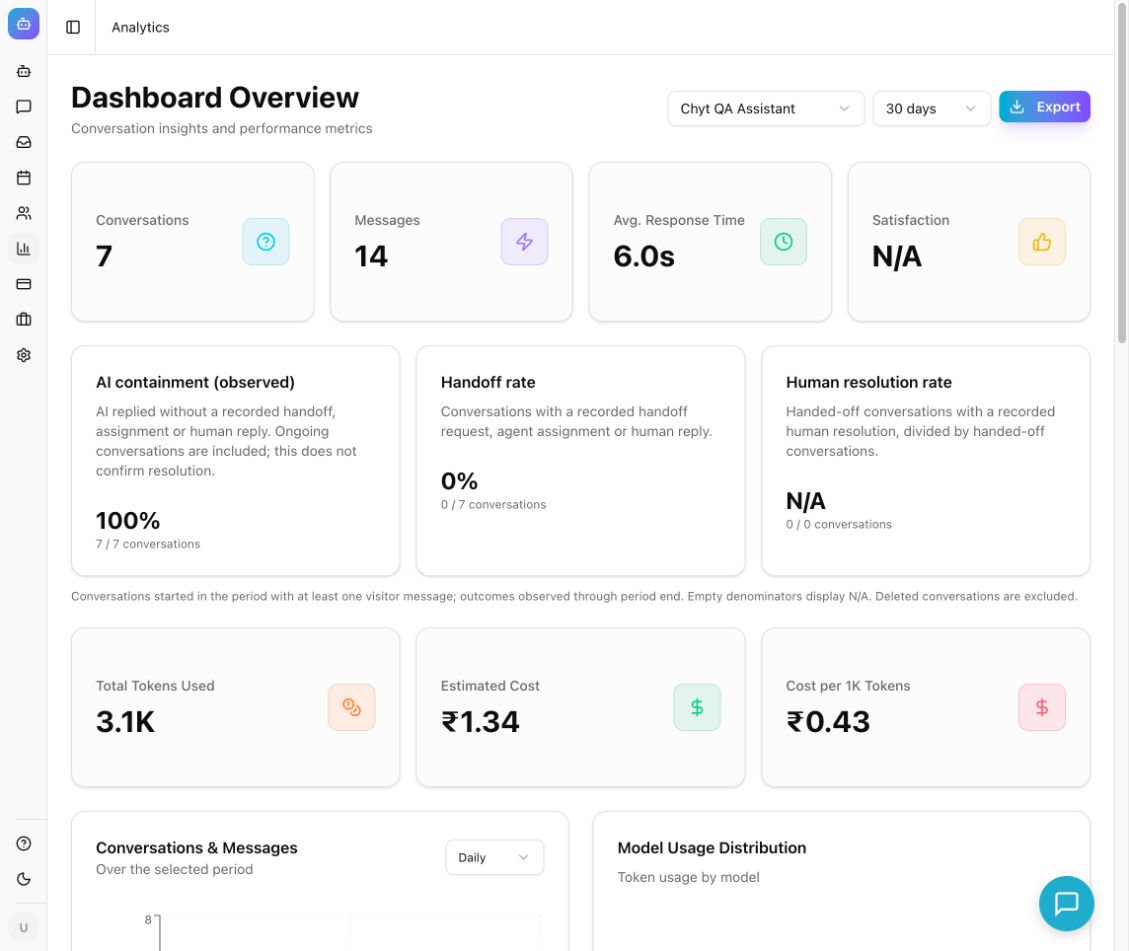
Example from the Chyt.ai dashboard (September 2026).
Review a conversation
- Open Conversations → All Conversations.
- Use Search conversations..., All Chatbots, and All Channels to narrow the list. The current channel filter offers Web, Widget, and API.
- Open a conversation and read the visitor's question alongside the chatbot answer. Inspect Details, source references when present, feedback, and Token Usage.
- If an answer is wrong, use Correct this answer on the response. Review Question and Wrong Answer, enter a supported Correct Answer, and select Save Correction.
- Re-test the same question and a paraphrase in the chatbot preview. A saved correction is an input to future answers; verify the result rather than assuming every wording is fixed.
- Use PDF for an individual transcript. Use Export CSV on the conversation list for exported records. Review any Share settings before creating a share link, because recipients may be able to read the shared conversation.
- Use the Topics tab to inspect available topic clusters and identify repeated issues.
Read the analytics dashboard
- Open Analytics. The page is headed Dashboard Overview.
- Select the chatbot and choose 7 days, 30 days, or 90 days. Keep the selection consistent when comparing results.
- Review Conversations, Messages, Avg. Response Time, and Satisfaction for overall activity and feedback.
- Inspect Conversations & Messages, Model Usage Distribution, Token Usage, and Language Distribution to understand workload and model use.
- Review Knowledge Gaps, Top Intents, Customer Satisfaction, and Guardrail Events where data is available. Choose recurring gaps to improve in the chatbot's sources or instructions.
- Interpret outcome cards using their displayed definitions. AI containment (observed) means AI replied without a recorded handoff, assignment, or human reply; it does not confirm that the visitor's issue was resolved. Human resolution rate uses handed-off conversations as its denominator.
- Select Export to download the selected chatbot's analytics as CSV.
What you should see
You can connect a reported problem to the original transcript and use the selected period's metrics to choose improvements. Conversation and token counters describe usage; they are not commercial conversation or token caps. Managed AI capacity is governed by AI credits in Billing.
Troubleshooting
- N/A: the metric may lack an eligible denominator or feedback; it is not automatically zero performance.
- Unavailable or refresh warning: use Retry analytics. Previously loaded sections may be stale.
- Counts differ between views: check chatbot, period, filters, and the metric's denominator.
- Export fails: retry after confirming the selected chatbot and access. Do not assume the file was created until the download completes.
- Correction did not improve an answer: check whether its supporting source is current and test the exact question and a paraphrase again.
Continue learning
Handoff and inbox · Leads and verified contacts · AI credits